Most marketing gurus tell you that selling online takes five separate tools. They tell you to pay for big monthly bills before you make your first dollar. You don’t need to spend cash on page builders, email tools, and cart apps just to test an offer.
The Short Version
- Systeme.io gives you three funnels and up to 2,000 email leads on its free plan without asking for a credit card.
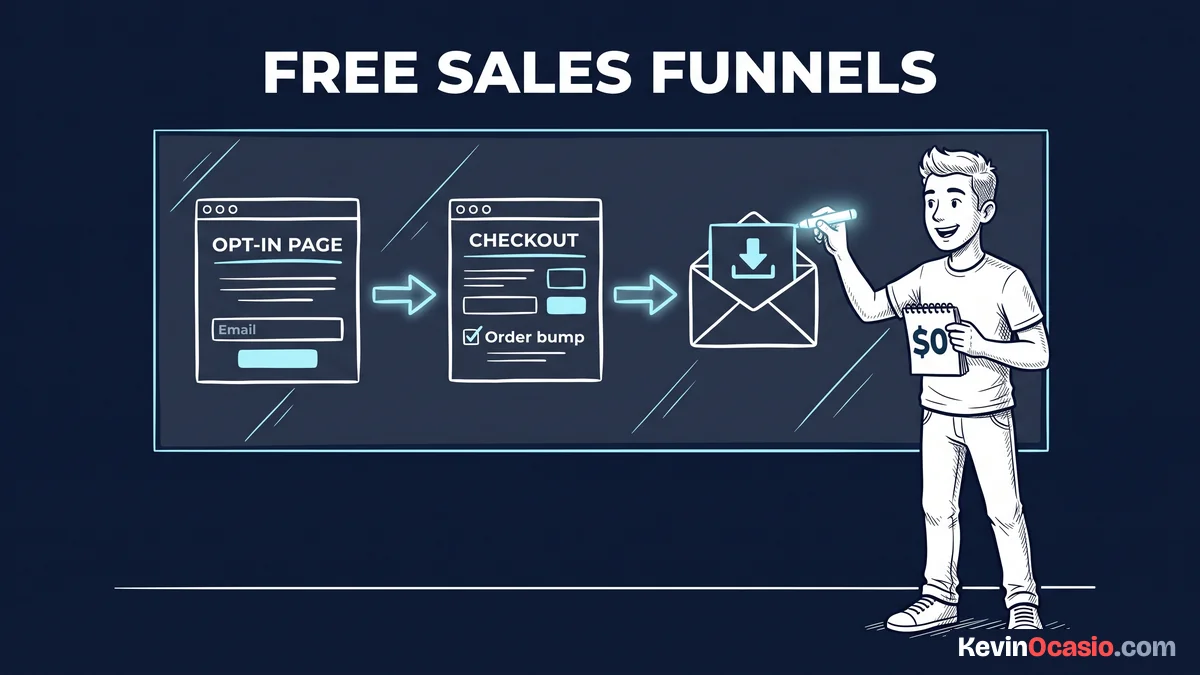
- A simple four-step funnel links an opt-in page, a bridge page, a checkout form, and one delivery email to sell your product.
- Adding a small order bump at checkout lets you collect more revenue from each buyer without extra tools.
Jump to Section
- Build Sales Funnel Free: Systeme.io Step-by-Step Architecture
- Designing a High-Converting Squeeze Page Without Extra Plugins
- Setting Up the Checkout Page and Adding an Order Bump
- Connecting Automated Email Delivery with One Tag and Rule
- Managing Plan Limits Before You Need to Upgrade
- Launch Your First Funnel Before Spending Money on Software
- Frequently Asked Questions About Free Sales Funnels
Build Sales Funnel Free: Systeme.io Step-by-Step Architecture
When you set out to sell an offer, extra tools slow you down. Beginners often try to tie together a blog, an email autoresponder, a cart plugin, and payment processors. That kind of multi-app setup costs money each month, and it breaks when plugins update.
Systeme.io removes that headache by putting every piece inside one dashboard. On the zero-dollar plan, you get three sales funnels and fifteen funnel steps. You also get unlimited email sends for up to 2,000 contacts, which gives you lots of room to make sales.
A working funnel only needs four basic steps to bring in cash. You need a squeeze page to collect leads, and a thank-you page that frames your offer. Then you add an order form for card payments and a quick delivery email to send your product file.
Sketch your funnel steps on paper before opening your dashboard. When you know where visitors land and what they click next, setup is fast. Building the funnel in your dashboard takes less than an hour.
Designing a High-Converting Squeeze Page Without Extra Plugins
Your squeeze page has one job. It gets visitors to trade their email for a helpful free guide. If you add big menus, social links, or long stories, people leave and forget why they came to your site.
You only have a few seconds to grab attention, so your headline must share a clear win. Clean landing pages follow a strict attention ratio with one clear goal and zero exit links. Leaving out sidebars and extra menus keeps visitor focus locked on your offer.
Inside the Systeme.io editor, start with a simple page template. Add a punchy headline and two short bullet points showing what’s inside the guide. Then drop in an opt-in box and a bold button, keeping friction low by asking only for a first name and email.
Once you save your squeeze page, test the button on your phone. Mobile traffic drives most clicks today. Your headline and form must fit clean on a small screen without tons of scrolling.
Setting Up the Checkout Page and Adding an Order Bump
After someone joins your email list, your thank-you bridge page sends them to your checkout. Setting up an order form inside Systeme.io takes very little work. You link a payment gateway like Stripe or PayPal in your account settings in about two minutes.
Systeme.io takes no cut of your sales on its free plan. You only pay standard card fees from your payment processor. You can sell digital guides, workshops, or calls right from your order form without paying thirty dollars a month for a separate cart app.
The best element you can add to your checkout page is an order bump. An order bump is a small checkbox right above the card fields offering a related add-on for ten to twenty-seven dollars. Because buyers already have their cards out, adding order bumps and upsells gives you an easy way to increase your checkout cash on the same traffic.
Create your bump offer as an add-on product in the editor. Set a fair price point that makes it an easy yes. When you offer an add-on that helps the buyer win faster, many customers check the box right away.
Connecting Automated Email Delivery with One Tag and Rule
Collecting leads and payments won’t help if you must email download links by hand. You need a simple rule that tags the buyer when they pay and sends their product file right away.
The free account gives you one contact tag and one automation rule. While that sounds small, it’s plenty of power to launch your first product. You assign your single tag to new buyers so you always know who bought your offer.
Open the automation rules tab inside your order form step and add a rule triggered by a new sale. Set the action to apply your product tag and send a short email with your download link. This rule runs day and night on autopilot, so buyers get their files instantly without any manual work on your end.
If you’re on a tight budget, this native rule replaces tools like Zapier. Those third-party apps charge monthly fees just to move data around. You can see where this fits into a lean path in my guide on how to start an online business under $50 a month.
Managing Plan Limits Before You Need to Upgrade
The free plan on Systeme.io is quite generous, giving you up to 2,000 contacts, three sales funnels, and fifteen funnel steps. Once you’re ready to launch more offers, paid Systeme.io pricing options start at $17 a month for ten funnels and 5,000 subscribers.
If you want to read all the cap details, check my breakdown on whether the Systeme.io free plan can run a real business. The short answer is yes. A list of 2,000 active leads is plenty to make good sales before you ever pay for an upgrade.
Here is how a zero-dollar all-in-one setup compares to paying for separate software subscriptions each month:
| Software Category | Separate Monthly Subscriptions | Systeme.io Free Plan |
|---|---|---|
| Funnel & Page Builder | $97/mo (Standalone funnel builder) | $0/mo (3 funnels, 15 steps) |
| Email Autoresponder | $20/mo (Paid email autoresponder) | $0/mo (Unlimited emails, 2,000 leads) |
| Checkout & Cart Software | $30/mo (Monthly cart subscription) | $0/mo (Native Stripe and PayPal) |
| Platform Transaction Fees | 2% to 5% extra on every sale | 0% platform fee |
| Total Monthly Software Cost | $147/mo or more | $0/mo forever |
When you run your business with a lean setup, your monthly bills stay at zero until sales pay the way. If you want a platform that handles your pages, email list, and checkout forms without monthly costs, you can test out my recommended sales funnel builder for free.
Launch Your First Funnel Before Spending Money on Software
You don’t need to spend weeks tweaking complex tools. Connecting webhooks and paying software bills before testing an offer will drain your budget fast. That’s the fastest way to run out of cash and lose steam.
Sign up for a free account today. Pick a clean template, and build your three funnel pages. Connect your Stripe account, add an order bump, and write a simple delivery note that sends your download link to new buyers.
Once your funnel is live, put your energy into getting traffic. Talk to buyers and make your offer better. When sales start rolling in, you can decide whether to upgrade or keep your costs at zero and protect your profit.
Frequently Asked Questions About Free Sales Funnels
Can you really run a sales funnel for free without hidden charges?
Yes, Systeme.io has a permanent free plan with no credit card required at signup. You get 2,000 contacts, three sales funnels, and unlimited email sends with zero platform fees.
Do you need a custom domain to make sales on Systeme.io?
No, you can launch funnels right away using a free systeme.io subdomain. Still, the free plan includes one custom domain link if you want your own web address.
What payment gateways can you connect on the free tier?
You can link Stripe, PayPal, Mercado Pago, and Razorpay right to your account. Systeme.io takes no cut of your sales, so you only pay standard card fees.
How do you deliver a digital product to a customer for free?
Upload your file to the order form asset box or put a download link inside a delivery note. The system sends the delivery email the moment payment clears.
What happens when your email list passes 2,000 subscribers?
Your account stays active and no contacts get deleted. You only need to upgrade to the Startup plan at seventeen dollars a month when you want to add new leads.
Can you build more than one sales funnel on the free account?
Yes, the free plan gives you three funnels and fifteen total funnel steps. That gives you plenty of space to test multiple free guides or digital products.