Most email tools try to do too many jobs at once. They add page builders and courses, but then they fail at getting words into an inbox. AWeber has sent emails since 1998. It’s easy to write it off as an old tool.
The Short Version
- Strong inbox placement makes this platform dependable if you send weekly newsletters and simple broadcasts.
- Strict list-based billing means you pay twice for the same person if they join two separate lists.
- Entry pricing stays fair at $15 a month for up to 2,500 contacts, but full tagging requires the $25 Plus plan.
Jump to Section
The 1998 Architecture: Lists Versus Modern Tags
AWeber started when email marketing was just getting off the ground. Tom Kulzer built the tool around separate lists where each one held its own closed box of names. That older design still runs under the hood today. The team added tags later on.
If someone grabs your free checklist and then buys your small course, you might put them on a buyers list. On AWeber, that person now sits on two different lists. You get billed twice for that one reader. The system counts total addresses across your whole account.
You can dodge extra charges if you keep one main list and use tags instead. But using tags inside a tool built for lists still feels clunky. Modern tools build around contacts first. That keeps things much cleaner.
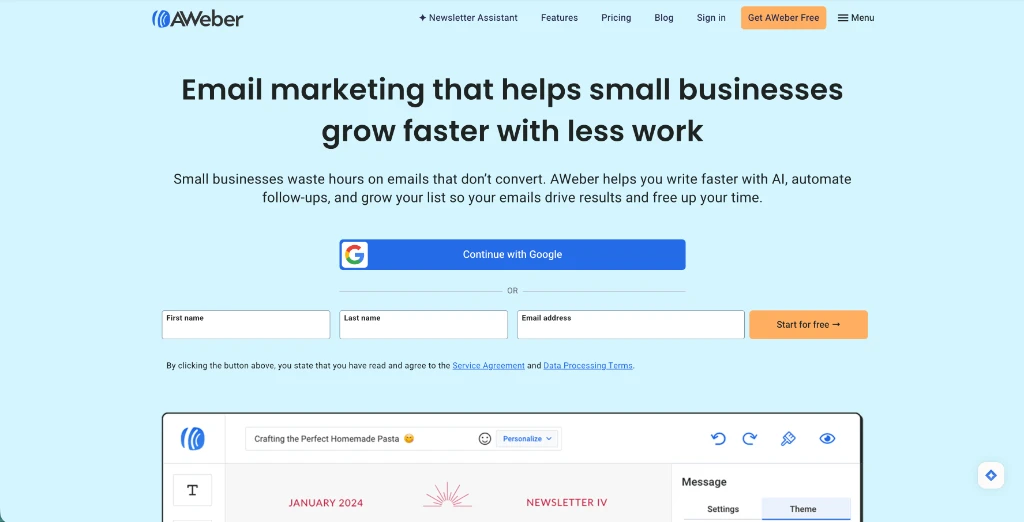
The message editor lets you set up clean broadcasts with pre-built layouts and custom styling. You write your subject line, pick your layout theme, and add your links. It works well if you want to send a clean broadcast without fighting a complicated design system.
Email Deliverability and Why the Shared IP Pool Still Matters
Extra tools don’t help if your emails end up in spam. Getting into the inbox is where AWeber still shines. Its track record gives you a real leg up over new tools.
Big inbox providers like Gmail and Yahoo know AWeber’s mail servers well. AWeber keeps close tabs on sender rules and runs shared mail servers. Thousands of good senders use those servers daily. Your emails get a solid sender score on day one.
When you send a weekly broadcast, simple text gets past spam filters much faster than heavy images. My guide on broadcast emails vs automated sequences shows why simple schedules help you keep your inbox delivery high.
You might stay with your first email tool because switching feels like a hassle. It’s easy to fall into status quo bias by holding onto what you know to avoid mistakes. But with email, sticking with a trusted delivery network keeps your messages out of spam.
Automation Workflows and Campaign Triggers
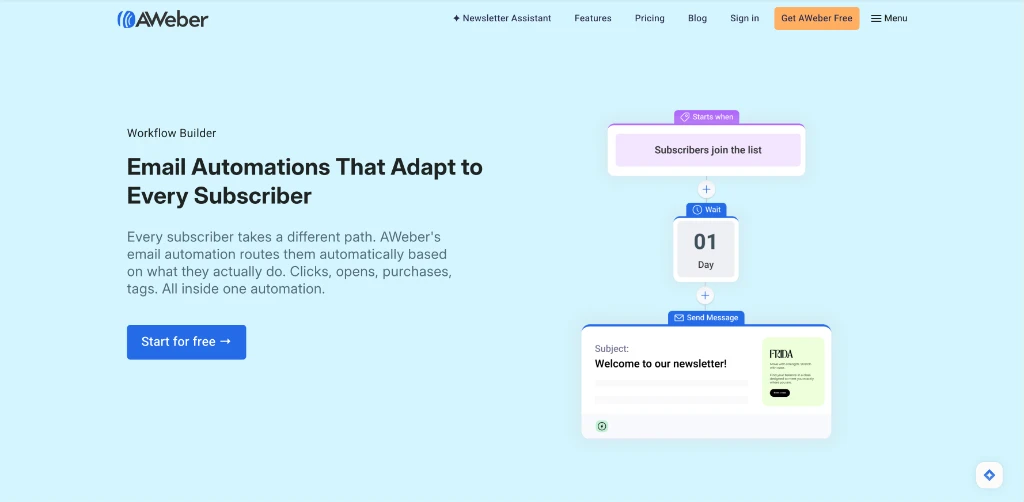
The campaign builder in AWeber uses a visual map where you drop steps onto a blank page. You can kick off a campaign when a new reader signs up or when you attach a tag to their name.
Setting up steps is quick. You add a wait step for one day, send an email, and tag anyone who clicks a link. It covers the simple welcome funnels most solo operators use every week.
If you want to write a simple follow-up series for your business, my walkthrough on a welcome email sequence that sells gives you the exact three-day outline to drop into this builder.
The limits pop up when you need complex paths. If you want branching rules based on webhooks or cart drops, AWeber feels stiff. It handles straight lines well, but it won’t replace a full marketing funnel tool.
AWeber Review: Lite vs Plus Plans and Real Limits
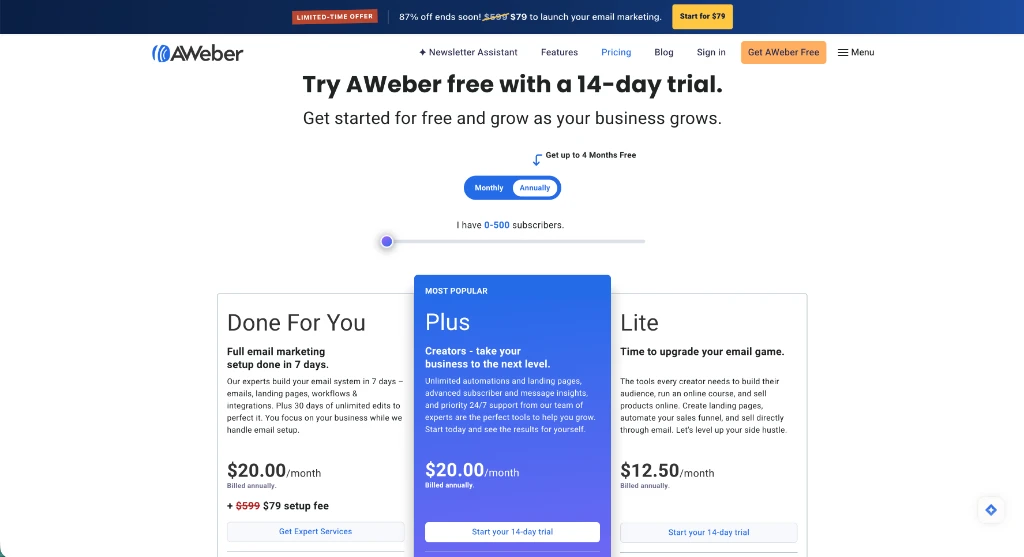
Pricing is where you need to read the fine print. AWeber gives you a 14-day free trial on its main plans, but the caps on each plan make a big difference in your monthly bill.
The Lite plan costs $15 a month, or $12.50 a month if you pay yearly at $150 upfront. That tier gives you room for up to 2,500 subscribers, which is a great limit for new sites. But it caps you at one email list, three landing pages, and only three automated campaigns.
Upgrading to the Plus plan costs $25 a month, or $20.00 a month when paid yearly at $240 upfront. The Plus plan removes the caps on lists and automations. It adds behavioral tagging and takes off the AWeber badge from your footer. High-volume senders can also pick an Unlimited plan for a flat $899 a month.
Whichever plan you choose, your delivery rates depend on how well you maintain your subscriber list. Leaving inactive subscribers on your account wastes money and hurts your sender score. To keep your inbox rates high on either tier, make sure you stop your marketing emails from landing in spam by clearing out inactive contacts who never open.
You can start a 14-day trial of AWeber to test the builder and see how it feels for your daily work.
Type your current list size into the calculator below to see what your monthly bill will look like as your audience grows.
Email Platform Cost Calculator
See how much cash you keep in your bank each year by picking the right email autoresponder instead of paying overpriced subscriber bills.
This comparison table breaks down the verified costs and feature limits across all three AWeber tiers:
| Plan Tier | Monthly Price | Subscriber Limit | Automations and Lists |
|---|---|---|---|
| Lite Plan | $15/mo ($12.50/mo annual) | Up to 2,500 contacts | 1 list, 3 automations, 3 landing pages |
| Plus Plan | $25/mo ($20.00/mo annual) | Up to 2,500 contacts | Unlimited lists, unlimited automations, custom branding |
| Unlimited Plan | $899/mo flat rate | Unlimited contacts | 15x monthly volume, dedicated account manager |
Pick Your Email Setup Based on Your Business Model
AWeber isn’t dead, and it’s not just an old relic. It’s a solid email tool that focuses on great inbox delivery and real phone support.
If your business runs on a clean weekly newsletter and simple welcome emails, AWeber gives you a dependable home. You won’t have to stress over broken mail delivery or lost leads.
Make sure you pick the right plan before you start. Pick the Lite plan if you have one main list and only need two or three automations. If you plan to sell several products and want custom tagging rules, jump straight to Plus to avoid list limits.
Frequently Asked Questions About AWeber
Does AWeber have a free plan?
AWeber offers a 14-day free trial on its Lite and Plus plans. Paid plans start at $15 a month (or $12.50 a month on yearly billing) for up to 2,500 contacts.
Does AWeber offer phone support?
Phone support is available 24/7, along with live chat and email help across every paid plan.
Can I use tags on AWeber?
Custom tags let you group readers and trigger automated campaigns based on clicks and form signups.
What happens if a subscriber is on two AWeber lists?
When a contact signs up for two separate lists in your account, AWeber bills you for two subscribers.
What is the difference between AWeber Lite and Plus?
Choosing the Plus plan gives you unlimited lists, unlimited automations, and removes the AWeber branding from your emails.
Does AWeber integrate with WordPress?
WordPress connects easily through official plugins, shortcodes, and standard API keys to grab leads from your site.
Can I export my contacts from AWeber?
Exporting your list takes just a few clicks and gives you a CSV file with tags and sign-up dates.