
Every January, thousands of website footers show outdated copyright dates. An old copyright year makes your site look abandoned to new visitors. KO Auto Copyright Year gives you a clean shortcode to show an auto copyright year in wordpress footers automatically.
You can set your copyright text once and let your site update the date on New Year’s Day forever. This tool is part of my collection of free WordPress plugins built to keep everyday website tasks simple.
- Version: 1.0.0
- Requires WP: 6.0+
- PHP: 7.4+
- Frontend Assets: 0 KB
- License: GPLv2
Why I Built KO Auto Copyright Year
Manually editing footer dates across a bunch of websites every year is annoying busywork. If you manage client sites, it’s easy to miss a few pages.
Most themes don’t include dynamic date shortcodes. Heavy utility plugins force you to install big libraries just to show four digits.
I built this micro-plugin to solve the problem with zero fuss. You drop in a simple shortcode and your footer year updates on its own on January first.
How to Keep Your Footer Year Updated Automatically
Here is how this shortcode tool manages your footer dates:
- Dynamic Shortcode: Add
[ko_year]anywhere in your footer or theme templates to print the current four-digit year. - Date Range Support: Combine your start year with the shortcode (like 2020-
[ko_year]) to show your full business history. - Theme & Block Support: Works inside classic widgets, block theme templates, text widgets, and custom PHP hooks.
- Zero Frontend Script Weight: Runs on fast server PHP with 0 KB of frontend JavaScript or CSS.
- 100% Free & Open Source: Released under the GPLv2 license with full source code on GitHub.
How to Install and Use KO Auto Copyright Year
Setting up auto-updating copyright dates takes less than two minutes:
- Download the ZIP: Grab the latest
ko-auto-copyright-year.zipfile using the download button above. - Upload & Activate: Head into Plugins -> Add New Plugin -> Upload Plugin in your dashboard, pick the zip file, and click Activate.
- Add Your Shortcode: Paste
[ko_year]into your footer copyright widget or theme settings box.
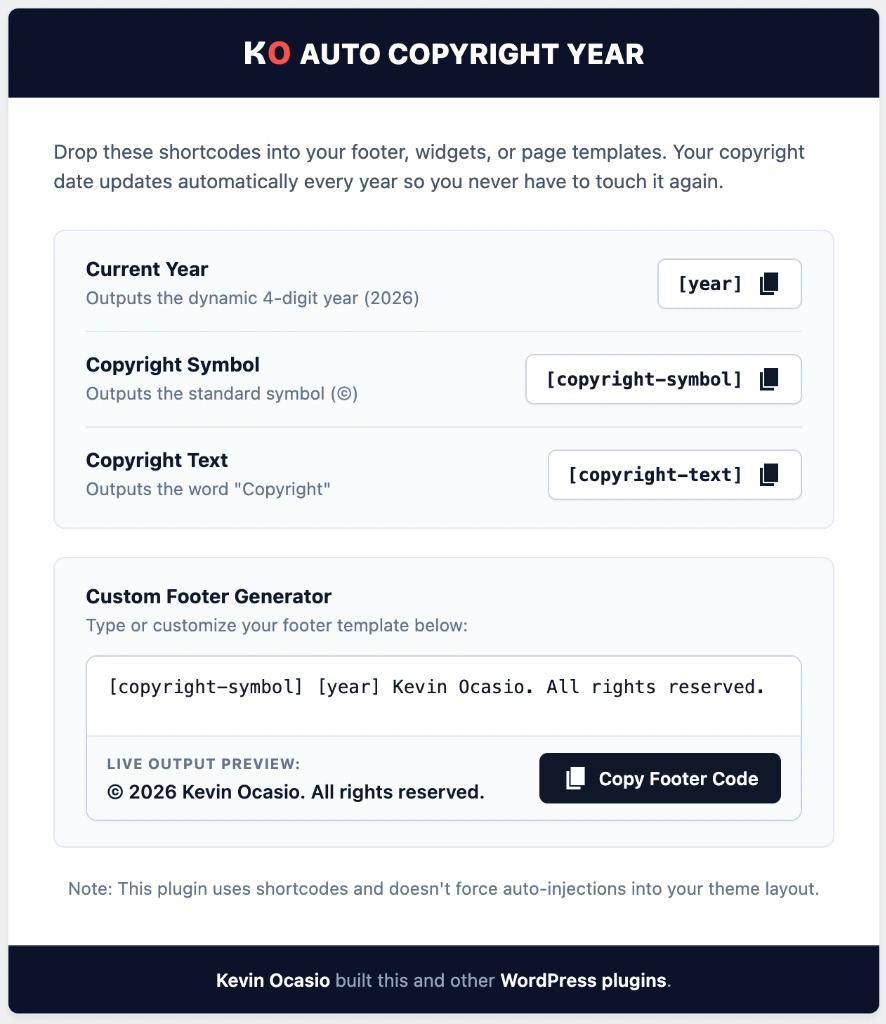
Once pasted, your footer will always display the correct current year without any manual edits.
Frequently Asked Questions About KO Auto Copyright Year
How do I show a copyright year range like 2020-2026?
You can type © 2020-[ko_year] Your Site into your footer widget. It will display the full date range automatically.
Does this shortcode work inside Gutenberg block themes?
Yes. You can paste the shortcode into any Paragraph block, Shortcode block, or Site Footer template part.
Will this plugin slow down my website?
No. It runs on a single line of PHP date code and loads 0 KB of scripts on your pages.
Can I use this plugin on client websites?
Yes. KO Auto Copyright Year is licensed under GPLv2, so you can install it freely on any website.