Finding the best cheap web hosting feels easy at first. Then your intro discount ends and the renewal bill hits your card. Most budget hosts advertise tiny teaser rates to get you through the door, only to triple your price twelve months later.
The Short Version
- Hostinger delivers the best balance of low four-year pricing, fast LiteSpeed servers, and an easy control panel for beginners.
- SiteGround offers top-tier speed and support on Google Cloud, but high renewal fees make it expensive for small blogs.
- HostArmada provides true cloud SSD hosting with traditional cPanel tools and modest renewal jumps for steady multi-site growth.
Jump to Section
- The Real Cost of Cheap Hosting: Promotional Traps vs Long-Term Bills
- Hostinger: The Best Cheap Web Hosting for Solopreneurs on a Tight Budget
- SiteGround: Premium Cloud Speed with a Painful Renewal Price
- HostArmada: Fast Cloud SSD Hosting for Traditional cPanel Users
- The Head-to-Head Hosting Comparison
- Pick the Host That Protects Your Monthly Cash Flow
- Frequently Asked Questions About Cheap Web Hosting
The Real Cost of Cheap Hosting: Promotional Traps vs Long-Term Bills
Every budget host hooks you with a massive signup discount. You see big ads promising hosting for two or three dollars a month. But that teaser rate only lasts for your first billing term. Once that first term wraps up, your bill can double or triple overnight.
Check your renewal rate before you type in your card details. If you skip that step, you can get stuck with high monthly bills. A host that costs thirty dollars for year one can jump to over two hundred dollars later. That surprise charge hurts when your site is still new and making small sales.
Always check multi-year hosting math before you pick any host. Hostinger lets you lock in low promo rates for an entire four-year term to protect your wallet. SiteGround has cheap signup rates, but their basic plan jumps to nearly eighteen dollars a month after year one. HostArmada sits right in the middle with fair cloud rates and modest renewal costs.
Hostinger: The Best Cheap Web Hosting for Solopreneurs on a Tight Budget
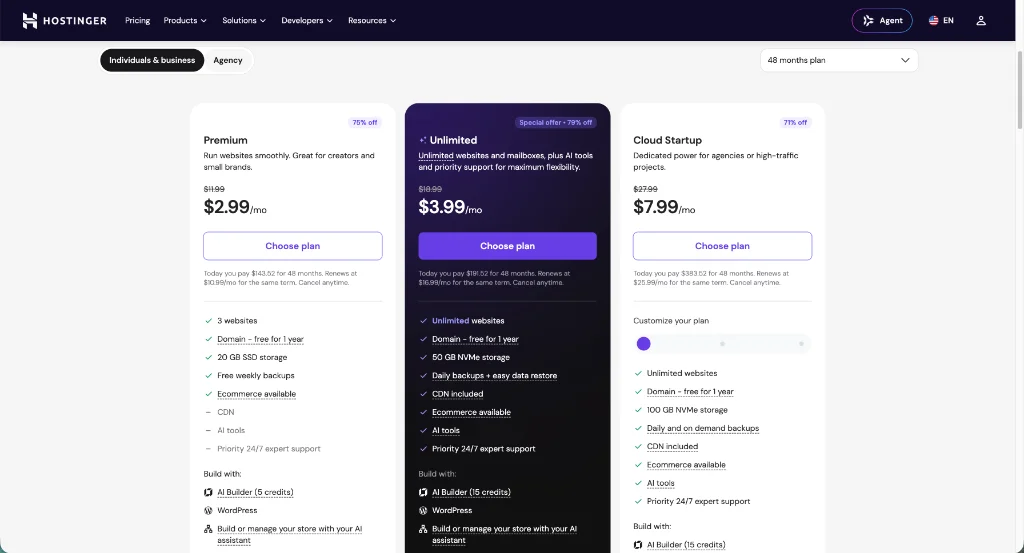
Hostinger is my top pick when you want reliable hosting that keeps your monthly bills low. Their Premium plan starts at $2.99 a month when you pay for four years upfront. It renews at $10.99 a month. That gives you steady hosting costs so you can focus on building traffic.
Behind the scenes, Hostinger runs on fast LiteSpeed web servers and solid-state drives. Even on basic plans, your WordPress pages load quick and crisp without messy server tweaks. You also get a clean control panel called hPanel. It cuts out the clutter of older dashboards and lets you install WordPress with one click.
If you want to run multiple websites, Hostinger lets you host them on a single account. That saves you from buying extra hosting every time you test a new digital product idea. Read my Hostinger breakdown for a look inside the dashboard. Or head straight to Hostinger to lock in your four-year rate.
SiteGround: Premium Cloud Speed with a Painful Renewal Price
SiteGround built its name on fast speeds and great customer help. Their platform runs on Google Cloud servers. Your site loads fast and stays online during traffic surges. If a bad update crashes your database, their support team answers live chat questions in minutes.
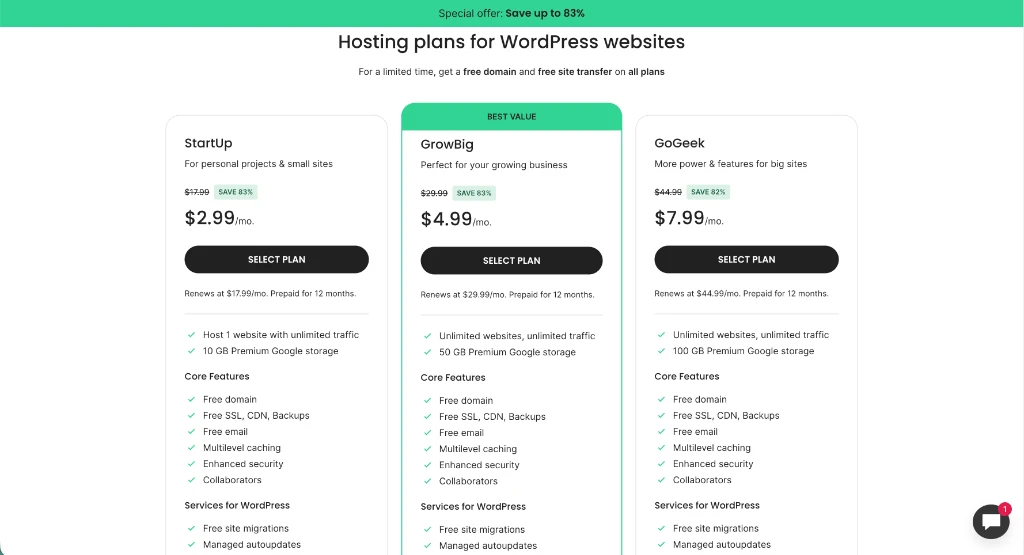
The main catch with SiteGround is the long-term price tag. Promo rates start at $2.99 a month on a one-year term. But their basic StartUp plan renews at a steep $17.99 every month. If you move up to their GrowBig plan to host more sites, your renewal climbs to nearly thirty dollars a month.
That renewal jump makes SiteGround tough to justify for a brand-new blog with low monthly income. But if you run a busy site that makes steady sales, that cost might be worth it. SiteGround gives you great help and daily backups to protect your site. You can check out SiteGround if your budget has room for higher renewal rates.

HostArmada: Fast Cloud SSD Hosting for Traditional cPanel Users
HostArmada takes a fresh path by running every account on a cloud SSD platform. They don’t cram hundreds of sites onto one hard drive. They give your account dedicated cloud resources to keep your load speeds steady. This setup stops a busy site on your shared server from slowing down your pages.
Unlike hosts that force you into custom dashboards, HostArmada sticks with standard cPanel. If you have run websites for years, you’ll like having standard file tools, email boxes, and phpMyAdmin right where you expect them. For newer site builders, crowded icon menus create unnecessary cognitive load and make basic settings harder to find.
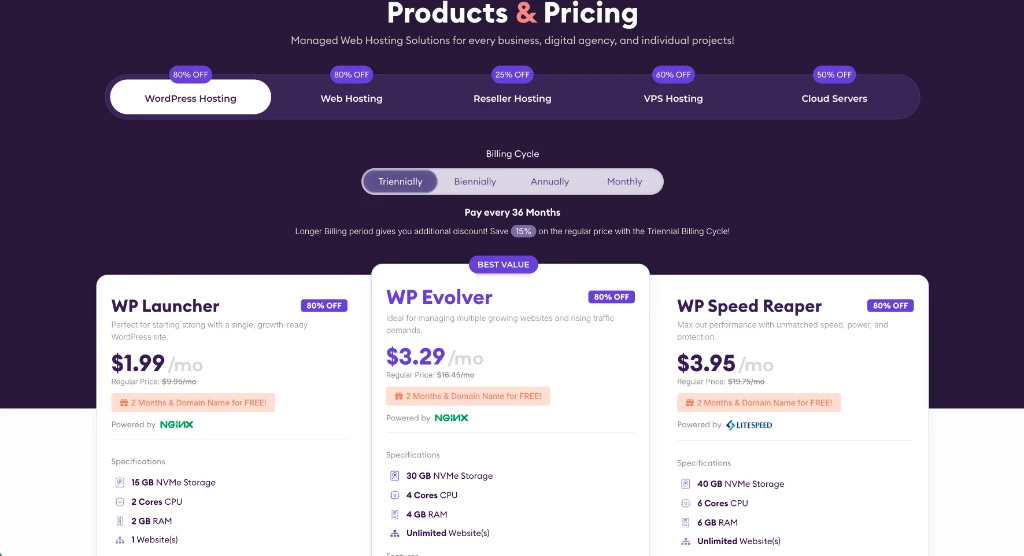
HostArmada starts at $1.99 a month on a three-year promo, and their basic WP Launcher plan renews at $9.95. That renewal rate is much lower than SiteGround. You still get daily backups, cPanel tools, and fast page caching. You can test HostArmada if you want cloud uptime without paying high managed rates.

The Head-to-Head Hosting Comparison
Compare promotional signup rates, standard renewal prices, storage limits, and server tools side-by-side to pick the right host for your budget.
| Hosting Feature | Hostinger | SiteGround | HostArmada |
|---|---|---|---|
| Promotional Starting Rate | $2.99/mo (48-month term) | $2.99/mo (12-month term) | $1.99/mo (36-month term) |
| Standard Monthly Renewal | $10.99/mo | $17.99/mo | $9.95/mo |
| Server Technology | LiteSpeed Web Server | Google Cloud Platform | Cloud SSD Platform |
| Control Panel Interface | Custom hPanel | Custom Site Tools | Traditional cPanel |
| Included Storage (Entry) | 20 GB SSD | 10 GB SSD | 15 GB Cloud SSD |
| Automated Backups | Weekly (Daily on Business) | Daily automated backups | Daily automated backups |
| Best Budget Fit | Best overall long-term value | High-budget projects | Traditional cPanel lovers |
You might worry that cheap hosting will ruin your page speed. In my guide on how cheap hosting cuts corners on speed, I show that smart caching and light themes keep budget setups running fast. Once you pick your host, follow my guide on how to start a WordPress blog on Hostinger. You’ll have your site live in under twenty minutes.
Pick the Host That Protects Your Monthly Cash Flow
Picking web hosting doesn’t require deep tech skills or big startup money. Your hosting should keep your site online, load your pages quickly, and stay cheap enough that renewal bills never stress you out.
For most solopreneurs on a budget, Hostinger is the smartest choice. A four-year promo gives you plenty of runway to grow your audience without sudden price hikes. If you want classic cPanel tools, HostArmada gives you great cloud speed at fair renewal rates. Save SiteGround for projects that already make enough monthly profit to cover higher renewal bills.
Make your choice based on your current budget today, launch your WordPress site, and get back to creating content that gets real results.
Frequently Asked Questions About Cheap Web Hosting
Is cheap web hosting fast enough for a new WordPress blog?
Yes, modern budget web hosts use solid-state drives and server caching that keep pages fast. As long as you stick to light themes and avoid heavy plugins, cheap hosting easily handles early traffic.
What happens when my cheap hosting promotional discount ends?
Your account renews at the regular rate once your intro discount ends. Check your renewal terms before you buy so you never face surprise charges down the road.
Can I upgrade my hosting plan later as my traffic grows?
All three hosts let you upgrade to larger plans or cloud servers with one click. You only pay the prorated difference for extra room as your traffic grows.
Do I need cPanel to manage my WordPress website properly?
No, custom control panels like Hostinger’s hPanel and SiteGround’s Site Tools handle every main task with ease. Many veteran site owners still like cPanel because they learned on it years ago.
Which cheap web host is easiest for complete beginners?
Hostinger gives you the simplest setup. Its clean dashboard lets you install WordPress with one click. You can point your domain and launch a live website in less than fifteen minutes with zero technical training.